

Set up from the Meilisearch Cloud dashboard
Open your project in the Meilisearch Cloud dashboard, select the Search rules tab, and click New rule. The visual editor opens. For a walkthrough of the editor, see Create your first rule.Choose when the rule applies
Choose the index, hereproducts. In the Your rule panel, select These words, then type coffee in the search bar. The rule now applies to every search containing that word, in any order, so it also covers “coffee machine” or “best coffee grinder”.
Pin the documents
To pin a document near the top, drag its card onto the position you want. For a document further down the results, hover its card and click the pin icon, then click the pin again and enter its new position in Move to position. Pin the espresso machine at position1, then the coffee mug at position 2. Each pinned card shows a filled pin, and the What changes section of the panel lists your pins in order.
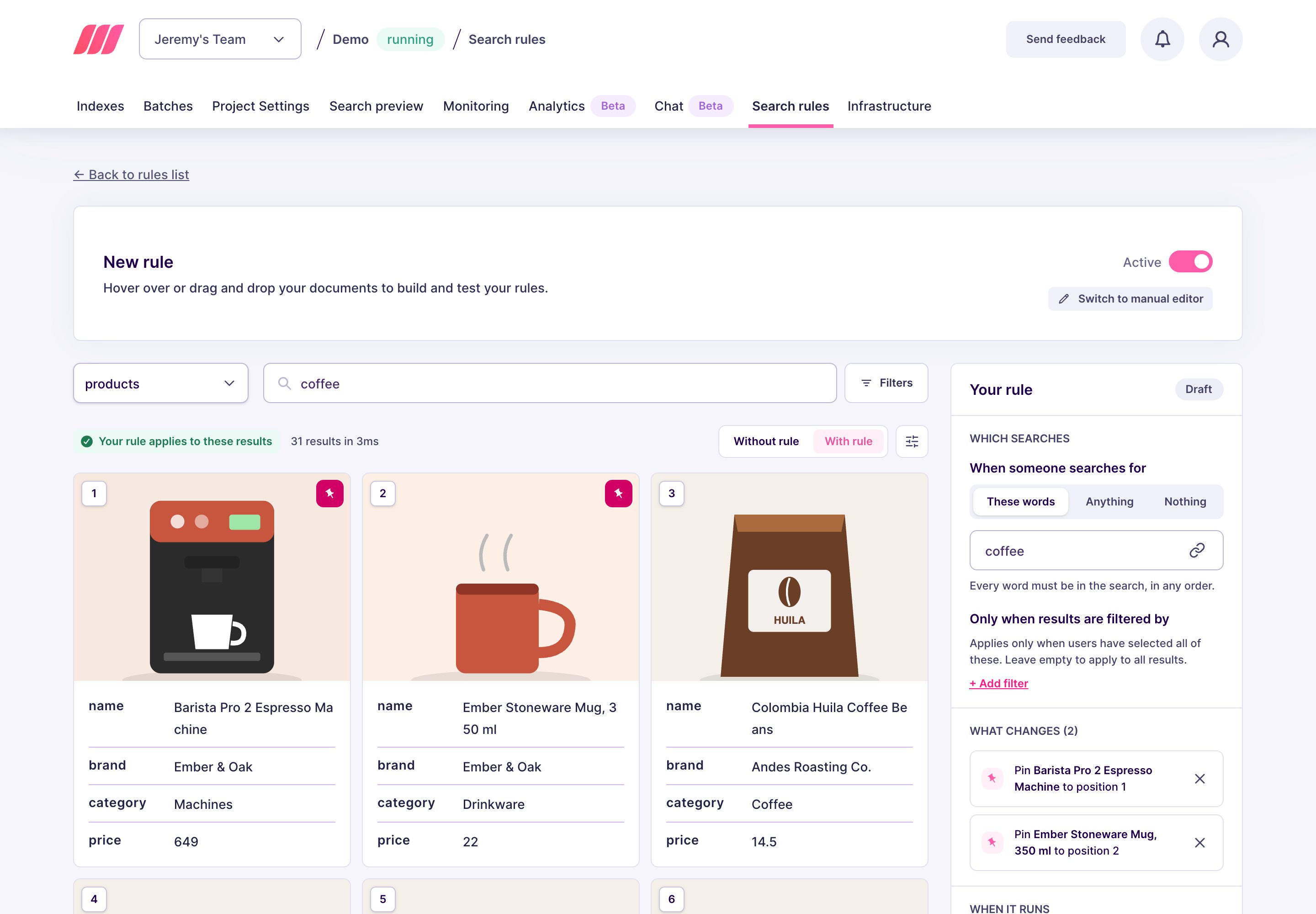
1 and 5 leaves organic results in between.
Save the rule
Click Save rule. In the Review and save dialog, name the rule, such ascoffee-top-picks, then click Save and activate. Meilisearch indexes the rule, which can take a few seconds to a few minutes. Once it is live, a search containing “coffee” starts with your two picks, in the order you chose.
Set up on a self-hosted instance
- Each entry in
pinplaces one document at one position. The order of the entries does not matter, thepositionvalues do. - Positions count from
0in the API, so0is the first result. The dashboard displays the same slot as position1. - If the current search filters exclude a pinned document, Meilisearch drops that pin and an organic result takes the slot. The other pins stay where you put them. See specific behaviors.
taskUid, because creating a rule is an asynchronous operation:
succeeded status. To follow its progress, pass the taskUid to the task API.
From then on, every search containing “coffee” starts with your two picks, in the order you chose, and the organic results follow.
Next steps
Boost documents
Rank a selection of documents higher during a campaign
Hide documents
Remove documents from the results without reindexing
Specific behaviors
See how pins interact with filters and with the other actions
API reference
Endpoints, rule fields, and update behavior